
Your CV (Curriculum Vitae) is more than a list of jobs — it is your personal marketing tool. Before a recruiter sees your face or hears your voice, they see your resume. In just 6–10 seconds, they’ll decide whether to shortlist you or move on to the next candidate.
That’s why having a well-written, professional CV is essential for landing interviews.
This guide covers the most important CV do’s and don’ts to help you create a clean, polished, and job-specific resume that stands out.
Do #1: Keep Your CV Clean, Simple, and Easy to Read
A cluttered layout can instantly turn recruiters away. A clean design makes your resume look professional and easy to scan.
✅ What to Do:
- Use clear section headings: Profile Summary, Work Experience, Education, Skills
- Choose professional fonts: Calibri, Arial, Times New Roman
- Write bullet points, not long paragraphs
- Keep font size 10–12 pt for body text
- Ensure consistent spacing and margins throughout
❌ Avoid:
- Using bright colors, images, or decorative borders
- Mixing too many font types or sizes
- Shrinking text to fit everything on one page
A clean layout communicates organisation, attention to detail, and professionalism.
Do #2: Tailor Your CV to Each Job Application
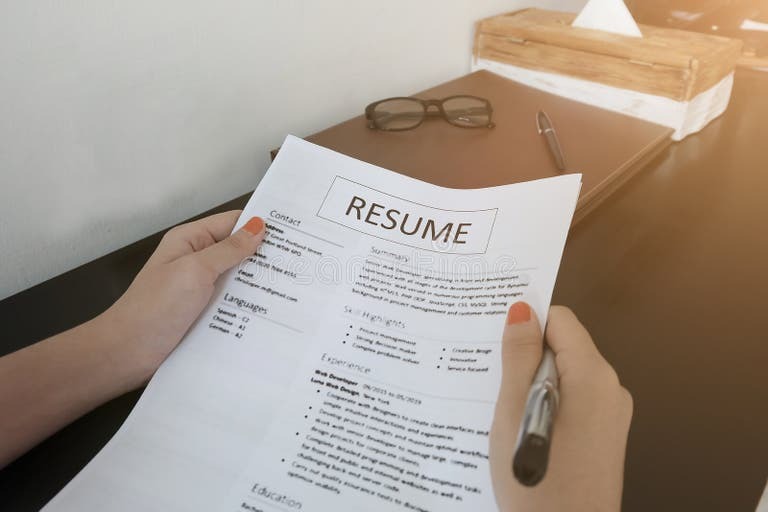
Sending the same CV to every employer is one of the biggest job-seeker mistakes.
✅ What to Do:
- Carefully review the job description
- Highlight relevant skills and experience
- Adjust your profile summary to match the role
- Use keywords from the job ad (especially technical terms and job titles)
- Put your most relevant experience first
❌ Avoid:
- Submitting a generic, one-size-fits-all CV
- Listing experience unrelated to the role
- Ignoring job-specific language
A tailored CV shows employers that you understand what they need and are genuinely interested.
Do #3: Start With a Strong Profile Summary
Your profile summary is a short introduction that tells employers who you are and what you offer.
✅ What to Do:
- Keep it 3–4 lines
- Mention your current role (e.g., “Experienced sales professional”)
- Highlight key skills or areas of expertise
- Add one or two achievements or strengths
Example:
“Detail-oriented administrative assistant with 3 years of experience in customer service, data entry, and office support. Skilled in Microsoft Office, document management, and email coordination. Known for strong accuracy, efficiency, and excellent client communication.”
❌ Avoid:
- Writing long, story-like paragraphs
- Using vague words like “hardworking” without context
- Copying generic summaries from the internet
Your summary should make the recruiter say: “That’s exactly what we’re looking for.”
Do #4: Highlight Achievements, Not Just Duties
Many CVs simply list responsibilities — but employers want to see what you accomplished.
✅ What to Do:
- Use numbers, percentages, and results
- Begin bullet points with strong action verbs (managed, coordinated, improved, increased, resolved)
- Show how you added value
Instead of:
“Worked as a cashier in a retail store.”
Write:
“Processed 80–100 customer transactions per shift while maintaining a 99% cash-up accuracy rate.”
❌ Avoid:
- Long, vague paragraphs
- Listing only tasks with no measurable results
- Buzzwords without real achievements
Achievements make you memorable and prove what you bring to the role.
Do #5: Check Your Spelling, Grammar, and Accuracy
Even small errors can make your CV look unprofessional.
✅ What to Do:
- Run a spell check
- Ask someone to proofread
- Double-check dates, job titles, and contact details
- Read your CV aloud to catch missed errors
❌ Avoid:
- Rushing through the final review
- Using casual or informal language
- Forgetting to update your contact information
A polished CV shows professionalism and attention to detail.
Do #6: Use the Correct CV Length
Your CV length should reflect your experience.
✅ What to Do:
- 1 page if you’re a student or recent graduate
- 1–2 pages for most professionals
- Up to 2 pages for experienced candidates
❌ Avoid:
- CVs longer than 3–5 pages
- Shrinking your font to fit everything
- Over-spacing your CV to fill space
Every line on your CV should serve a purpose.
Do #7: Include the Right CV Sections
A well-structured resume makes it easy for recruiters to find essential details.
Essential Sections:
Contact Information:
- Full name
- Phone number
- Professional email
- City/region
Profile Summary:
A short 3–4 line introduction.
Education:
- Qualification
- Institution
- Years
- (Optional) Achievements or relevant subjects
Work Experience:
- Job title
- Company name
- Dates
- 3–6 bullet points for achievements and responsibilities
Skills:
- Technical skills (e.g., Excel, Photoshop, coding languages)
- Soft skills (communication, teamwork, problem-solving)
Optional Sections:
Projects, volunteering, certifications, awards.
❌ Avoid:
- Making “Curriculum Vitae” the main heading — use your name instead
- Hiding contact details at the bottom
- Mixing sections without clear headers
Don’t #1: Include Unnecessary Personal Information
Some details create bias and are not needed.
❌ Avoid adding:
- Religious beliefs
- Political views
- Full ID number (unless required)
- Marital status or number of children (unless required)
- Expected salary (unless requested)
- Photographs (unless industry-specific)
✅ What to Do:
Focus on your skills, experience, and professional value.
Don’t #2: Lie or Exaggerate
Misrepresenting yourself can cost you job offers.
❌ Avoid:
- Faking qualifications
- Exaggerating software or technical skill levels
- Changing employment dates or job titles
✅ What to Do:
Be honest.
If you have employment gaps, explain briefly in a cover letter or interview.
Many employers check references — dishonesty can lead to disqualification.
Don’t #3: Use Unprofessional Email Addresses or Social Media
Your contact details reflect your professionalism.
❌ Avoid:
Emails like:
- gangster4life@
- sexybabe@
- dramaqueen@
✅ What to Do:
Use a simple, professional email such as:
Check your public social media profiles and hide or delete inappropriate content.
Do #8: Save and Send Your CV Properly

A professional CV also depends on how you submit it.
✅ What to Do:
- Save as a PDF to keep formatting clean
- Use a clear file name:
YourName_CV_2025.pdf - Attach the PDF — don’t send screenshots or photos
❌ Avoid:
- Uploading blurry images of your CV
- Using unclear file names like “finalcv2done.docx”
- Sending files in unusual formats
Final Thoughts
The perfect CV doesn’t need fancy graphics — it needs to be:
✔ Clear
✔ Honest
✔ Well-organized
✔ Tailored to the job
By following these key do’s (clean design, tailored content, measurable achievements) and avoiding common don’ts (clutter, dishonesty, unprofessional details), you significantly increase your chances of receiving the message every job seeker wants to see:
“We’d like to invite you for an interview.”
Related posts:
 The Ultimate Guide to Active Job Searching: Strategies to Stand Out in 2026
 Professional Architect
 How to Prepare for a Virtual Interview: 5 Essential Tips to Impress Your Interviewer
 Stand Out in the 2026 Job Market: Your Complete Career Guide”
 Remote Jobs in South Africa: Guide to Remote Work Before 2026
 Top University Degrees That Lead to High-Demand Jobs in South Africa (2026 Guide)